Import your guest list from a spreadsheet
Open Guest list then Import CSV, and either upload a file or paste your rows straight into the box. Each row is a name, a side, how many of them, and a phone number — and only the name is required, so a single column of names imports perfectly well.
WhereGuest list→Import CSV
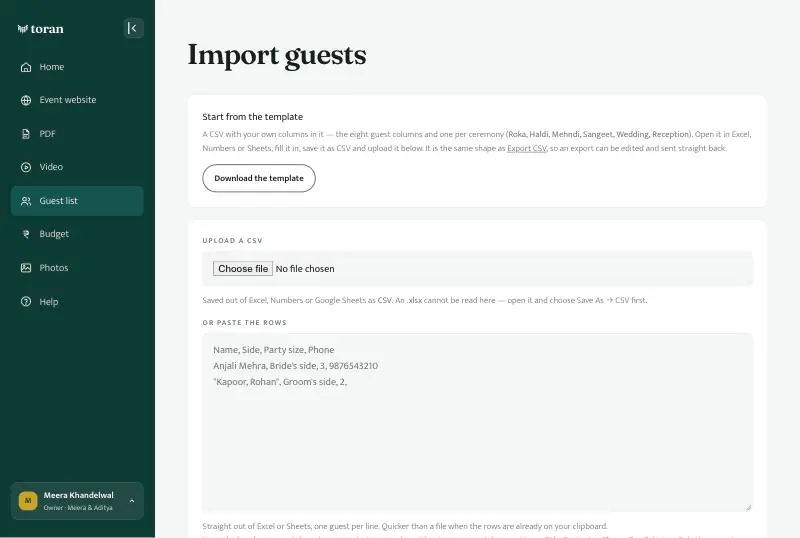
- Press Download the template if you want the exact column order in front of you. It is a small file with the headings and one example row.
- In your own spreadsheet, put the columns in that order and copy the rows.
- Paste them into the big box, or press the file picker and choose a `.csv` file.
- Press Import. You are told how many rows were read and which ones were skipped, before anything is added.
| Column | What goes in it | Required |
|---|---|---|
| Name | How the guest appears on your list | Yes |
| Side | Bride’s side, groom’s side, friends — your own words | No |
| Party size | A number. Blank counts as one | No |
| Phone | Any format. Not checked, not called | No |
Which ceremonies they get
Imported guests are not invited to anything yet. That is on purpose: a two-hundred-row import that silently invited everybody to every function would be very hard to undo. Add them to each ceremony afterwards, in bulk — see Invite guests to one ceremony.
If a row is rejected
A row with no name cannot be imported and is reported back to you with its line number. Everything else on the row is taken as text, so a phone number with spaces or a `+91` in it is fine and so is a party size that is blank.