Add a garland to your invitation
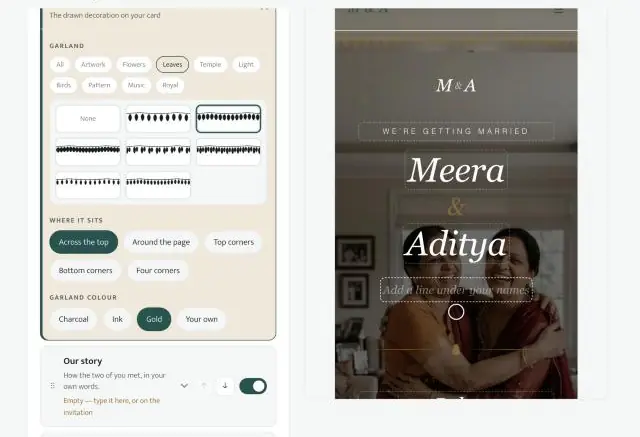
The garland is the drawn decoration on your invitation, and there are ninety-one of them: marigold strands, mango-leaf torans, bandhanwars, kalash, diyas, peacock feathers, gold bands and more. Open The garland in the editor, filter by category, press one, then say where it sits and what colour it is.
WhereEvent website→The garland
Finding one
The chips across the top narrow the grid: All, Artwork, Flowers, Leaves, Temple, Light, Birds, Pattern, Music and Royal. Fourteen are shown to start with and Show 77 more opens the rest. No garland is the first option and is a real choice — plenty of invitations look better without one.
Then three controls decide how it is used:
- Where it sits
- The placement: Across the top, Around the page, Top corners, Bottom corners or Four corners.
- Garland colour
- Charcoal, Ink, Gold, or Your own from a picker.
- How strong
- How solid the drawing is against the page. Turn it down and the garland becomes a watermark rather than a border.
The five placements:
- Across the top
- One band over the card, like a toran over a door.
- Around the page
- A frame on all four sides.
- Top corners
- Two, facing each other.
- Bottom corners
- The same, at the foot.
- Four corners
- All four.
And the four colours:
- Charcoal
- Near-black. Reads as a line drawing.
- Ink
- Your own ink colour, so it matches the type.
- Gold
- A metallic gold, which is what most printed cards use.
- Your own
- A colour picker, if none of the three is right.
The garland is drawn rather than photographed, so it is sharp at any size and weighs almost nothing — which matters on the connection most of your guests will open the invitation on. It prints on the PDF too.