Share your invitation on WhatsApp
Open Event website, then Go live, and you will find a WhatsApp message already written for you with your ceremonies and your link in it. Edit it if you like, press Open WhatsApp, and WhatsApp opens on your chat list with the message typed — you choose who it goes to.
WhereEvent website→Go live→Share it
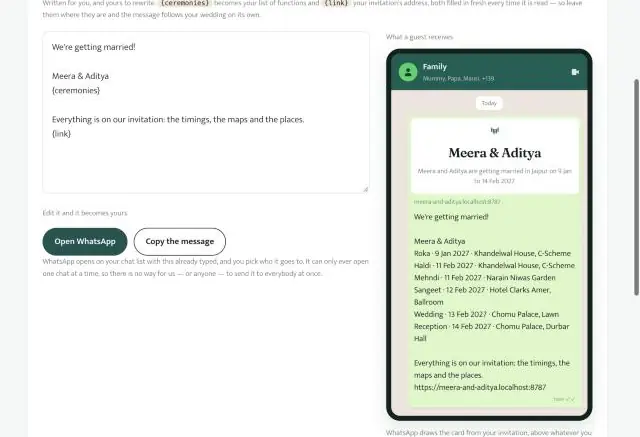
The two placeholders
- {ceremonies}
- Becomes your list of functions with their dates and venues, filled in fresh every time the message is read.
- {link}
- Becomes your invitation’s address.
Leave both where they are and the message follows your wedding on its own: add a ceremony next month and the message you send after that has it in. Type over them and you have a fixed message you will have to remember to update.
The three buttons:
- Save the message
- Keeps your edits. The message is yours from then on and we stop rewriting it.
- Open WhatsApp
- Opens WhatsApp on your chat list with the message already typed.
- Copy the message
- Puts it on your clipboard, for pasting anywhere else.
There is no send-to-everybody button
WhatsApp can only ever open one chat at a time, so there is no way for us — or for anybody — to send your invitation to four hundred people at once. That is a limit of WhatsApp rather than of Toran, and it is one worth being glad about: numbers that send identical messages to hundreds of people get restricted, and the number at risk would be yours.
If you want each guest to get their own link, so their reply arrives already attached to their name, send them the personal link from your guest list instead — see Send one guest their own link.