Print a QR code for your cards
The Go live tab carries a QR code that scans to your invitation, already the right shape for a printed card. Download it as a vector file for whoever is printing your invitations, or as an image for a chat or a document, and set the colour of the dots to match your cards.
WhereEvent website→Go live→A QR code for your cards
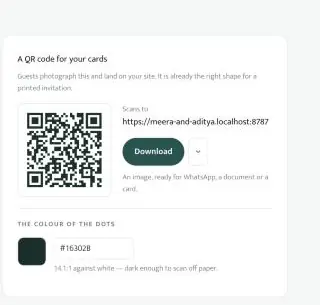
- Download
- An image file, ready for WhatsApp, a document or a card.
- For your printer
- A vector file, sharp at any size on a press. This is the one to send a printer.
- The colour of the dots
- A colour picker. The reading underneath it tells you how dark the colour is against white, and whether it is dark enough to scan off paper.
- Save the colour
- Keeps it, so both downloads come out in your colour from then on.
There is no QR code until your invitation is published, and that is deliberate: a square printed on four hundred cards that scans to a dead page is the one mistake here that cannot be corrected afterwards.